
Lexus
Lexus Mobile AppsAuto & Vehicles
4.74.93K Reviews
- Version
- 3.6.0
- Installs
- 500.00K
- Age Rating
- Everyone
Screenshots
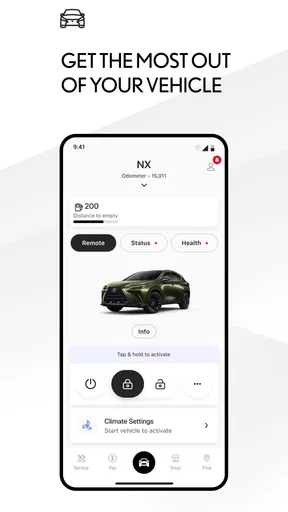
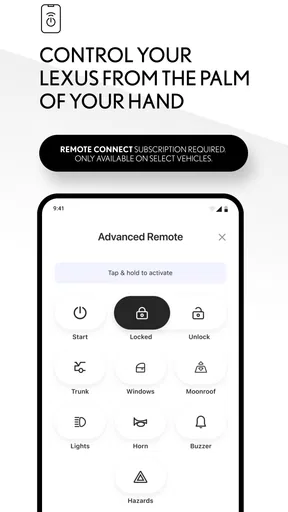
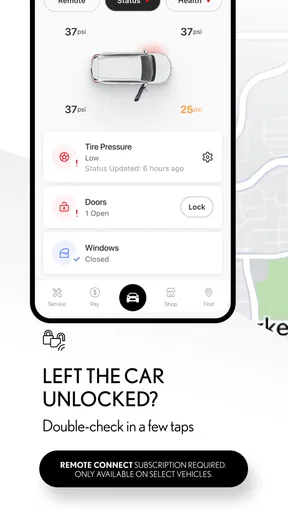
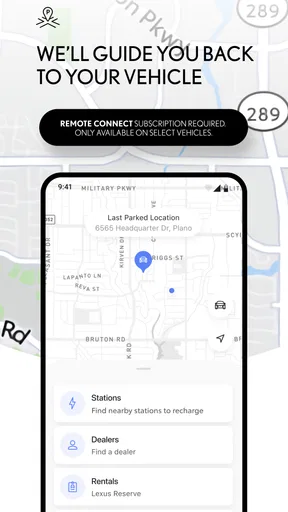
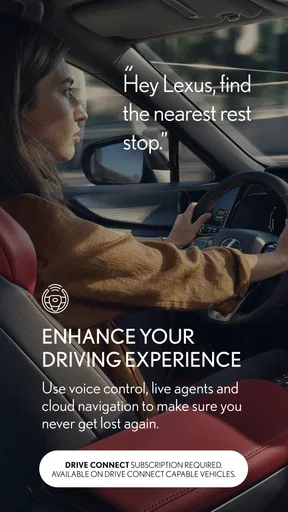
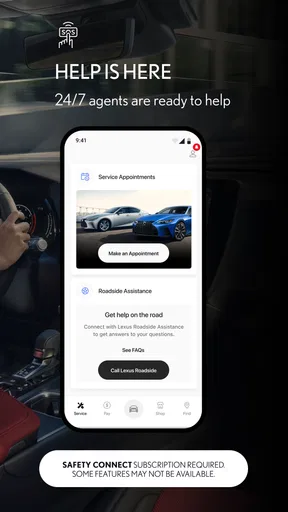
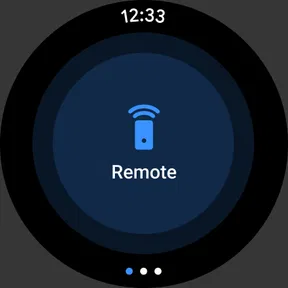
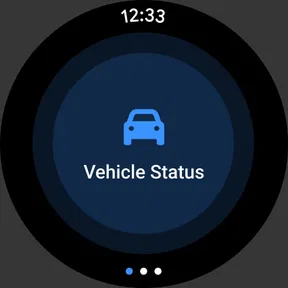
Our Review of Lexus
 Analysis by Appyee
Owning a Lexus can involve more small decisions than the drive itself: checking whether the vehicle is ready, remembering service needs, finding information before a trip, and keeping everything connected to the car in one place. That is the space where Lexus tries to be useful. I reviewed it as an Auto & Vehicles app from Lexus Mobile Apps, and its most valuable idea is not simply putting the brand name on a phone screen. It is the attempt to turn routine vehicle ownership into something I can manage before I reach the car.
The app is free and rated for Everyone, which makes it easy to try without treating it like a major commitment. It has built a strong audience, with a 4.7 average from around 41 thousand ratings and more than 500 thousand installs. Those figures suggest that many owners find a practical reason to keep it installed, although popularity alone does not guarantee that every Lexus owner will get the same experience.
Remote vehicle awareness is the feature that matters most
The capability I found easiest to appreciate is the app’s role as a remote companion for the vehicle. Instead of making me walk outside to check something or rely on memory after parking, it gives me a place to begin that check from my phone. That sounds modest, but it changes the rhythm of ownership. The app is most useful when I am not sitting behind the wheel and need a quick connection to the car.
This is different from a general driving app. A navigation service can help me plan a route, and a maintenance calendar can remind me about an appointment, but neither is built around my Lexus as the central object. Here, the vehicle is the starting point. I open the app with a specific car-related question rather than browsing a general collection of motoring tools.
That focus is also the reason I would not recommend installing it merely because it is a free automotive download. Its value depends on having a supported Lexus and wanting a direct digital link to that vehicle. The app currently supports Lexus vehicles from 2010 onward, while Hawaii has a newer-vehicle requirement beginning with 2018 models. That compatibility detail should be checked before expecting the app to become part of a daily routine.
For an eligible owner, the benefit is less about one dramatic function and more about reducing small interruptions. I can use the phone as the first place to check vehicle-related information, prepare for a visit to a dealer or service location, and keep ownership tasks from being scattered across paper, memory, and unrelated apps. The real advantage is reducing the number of times I need to switch from “I should check that” to physically going out to the car.
What using it feels like in an ordinary week
My realistic use case is a weekday morning when I am leaving for work and cannot remember whether I handled something before going inside the previous evening. Rather than treating the question as a reason to make a separate trip to the driveway, I open the app and use it as my first point of reference. If I am preparing for a longer journey, I can also use that moment to think about service, vehicle information, and the practical details I normally postpone until they become urgent.
The same pattern works after parking at a busy shopping center or airport. I may remember the general area but not the exact row, or I may want to check something connected with the car before walking away. A manufacturer-specific app is more relevant in that moment than a generic notes app because it keeps the vehicle relationship at the center of the interaction.
I also see value before contacting a dealer. Instead of beginning with a vague description of the vehicle, I can first review the information available in the app and organize what I need to ask. That makes the conversation more efficient. It does not replace a technician, and I would never treat an app screen as a mechanical diagnosis, but it can help me arrive better prepared.
That preparation is an overlooked strength. Many vehicle apps are judged by whether they can perform an impressive remote action, yet the quieter benefit is helping an owner remember what needs attention. I found the app more convincing when used as an ownership dashboard than when treated as a novelty. It encourages a short check before a trip or appointment, which can prevent avoidable confusion later.
Why the phone-based approach can be more convenient
A physical key, the vehicle’s built-in controls, and the owner’s manual still have important roles. They are immediate, familiar, and do not depend on me opening a phone. However, they are only available in particular places. The key is with me, the dashboard is in front of me, and the manual may be in the glove compartment. A mobile app extends the starting point beyond the vehicle itself.
That matters when the car is parked away from home, when another household member is using it, or when I am planning rather than driving. I can begin the ownership task from the same device I already use for calendars, messages, and appointments. The result is not necessarily faster for every action, but it is often more convenient because it fits into moments when I am already holding my phone.
Compared with a third-party vehicle logbook, the manufacturer connection is the important distinction. A logbook may be better for manually recording fuel, expenses, or repairs across multiple makes. I would choose that kind of tool if I owned several unrelated vehicles or wanted detailed personal records. Lexus is more focused: it makes sense when the car itself is the main subject and the owner wants a branded companion rather than a universal diary.
Compared with using a browser to search for Lexus information, the app also feels more intentional. A web search can answer a broad question, but it does not create the same sense of a dedicated home for the vehicle. I am less likely to lose the thread of what I was doing when the app opens around the ownership task instead of a general search page.
A useful workflow before a long trip
My preferred workflow is to use the app the day before a longer drive, not while rushing out of the house. I would open it to review the vehicle-related information available to me, note anything that needs follow-up, and then separate simple preparation from issues that require professional attention. This avoids the common mistake of discovering a concern five minutes before departure and hoping that a phone screen can settle it.
For a family trip, the app can also act as a shared reference point. One person may know the route while another handles the vehicle. Having the Lexus information in a dedicated app means the person helping with preparation does not need to search through unrelated messages or guess which details matter. I find that especially useful when the car is shared and the person driving is not the person who normally schedules service.
There is a trade-off in this workflow: the app supports preparation, but it should not encourage overconfidence. A green-looking status or an apparently normal screen is not the same as checking tire condition, fluid levels, warning lights, or professional maintenance requirements. I use the app to decide what deserves attention, not as permission to ignore the physical vehicle.
Another practical tip is to open it when I have time to act on what I find. Checking vehicle information during a busy commute creates awareness without leaving room to solve anything. A calmer check before shopping, travel, or a service call is more useful because I can immediately write down a question or make the next arrangement.
Where the experience can become frustrating
The first limitation is eligibility. Although the app supports a broad range of Lexus vehicles, the model-year rule matters, and the Hawaii requirement is different. Someone with an older vehicle outside the supported range may download the app, see the Lexus branding, and still discover that it is not the right companion for that car. I would verify compatibility before building a routine around it.
The second limitation is that a phone-based experience adds another layer between me and the vehicle. A physical control gives immediate feedback, while an app requires me to open it and wait for the relevant information to be available. If I am standing beside the car and need a simple answer, the vehicle itself may be quicker. The app is strongest when distance and planning are involved, not when it is competing with controls already within reach.
There is also a mental cost to having another account-based ownership tool. I have to remember that the app is useful only if I keep it current and remember to check it. An app cannot improve maintenance habits automatically if I never open it. For owners who prefer a paper service folder or who rarely use smartphone tools, the digital convenience may not outweigh the extra step.
I would also avoid judging the app as a replacement for every automotive service. It is not the best choice for detailed expense tracking, comparing repair prices across brands, or managing a mixed fleet. A general maintenance tracker can be more flexible in those situations. Likewise, a navigation app remains the better tool when the only thing I need is traffic-aware route planning.
The current release is version 3.5.0, and that gives the app a reasonably established feel rather than the impression of a brand-new experiment. Still, version numbers do not remove the need for patience when a vehicle connection or account session does not behave exactly as expected. My advice is to treat it as a helpful ownership channel, not the only channel. Keep the vehicle’s normal controls, service records, and dealer contact options available.
Who benefits most from keeping it installed
The strongest audience is a Lexus owner with a supported vehicle who likes to handle errands from a phone. I would especially recommend it to people who share a car, travel regularly, or tend to remember service questions at inconvenient times. The app gives those owners a dedicated place to begin instead of forcing them to reconstruct vehicle details from memory.
It is also a good fit for someone buying a used Lexus who wants a more organized ownership routine. The app does not eliminate the need to learn the car or inspect its history, but it can become part of a new owner’s process: review the available vehicle information, keep questions together, and prepare for the first service conversation. That is more useful than downloading it once and waiting for a dramatic notification.
Families may gain more than solo drivers because the app can reduce the knowledge gap between the person who drives and the person who manages appointments. A shared vehicle often creates uncertainty about what was checked, what needs attention, and who is responsible for the next task. A central mobile reference can make that handoff less informal.
On the other hand, I would skip it if the vehicle falls outside the supported model-year rules, if I own several brands and need one universal tool, or if I want detailed mileage and cost reports. I would also skip it if I strongly prefer physical controls and never plan to use a phone for vehicle tasks. Free does not mean useful for everyone; the app earns its place only when its Lexus-specific focus matches the way I manage my car.
The age rating of Everyone is appropriate for a vehicle ownership utility, and the absence of a purchase price makes trying it low-risk. Even so, I would judge it by saved effort rather than by the fact that it costs nothing. If it helps me prepare for a trip, remember an ownership task, or communicate more clearly with a service professional, it has done its job. If I only open it to look at a branded screen, it is taking up space without adding much.
My recommendation after using it
Lexus works best as a focused bridge between the owner and the vehicle, with remote awareness and preparation as its most meaningful contribution. I like it because it addresses the moments when I am away from the car but still need to think about it. The experience is less compelling when I am already seated behind the wheel, when I need a universal vehicle log, or when I expect the app to replace professional advice.
My recommendation is straightforward: if you drive a supported Lexus and want a convenient phone-based way to stay organized around it, the free download is worth trying. Give it a fair test during a normal week rather than judging it from a single launch. Use it before a trip, before a service conversation, and when the car is parked somewhere inconvenient. Those are the situations where its dedicated focus becomes clear.
For me, the app succeeds not because it makes ownership completely hands-off, but because it moves a few useful checks into the moments when I actually have time to think. That is a modest promise, yet a practical one. Owners who understand that boundary should find a capable companion; anyone looking for a universal automotive toolbox will probably be happier with a different option.
Privacy and Permissions
See what permissions an app requests and how it handles your data.
- Calendar
- add or modify calendar events and send email to guests without owners' knowledge
- Location
- approximate location (network-based), precise location (GPS and network-based)
- Phone
- read phone status and identity
- Camera
- take pictures and videos
- Wi-Fi connection information
- view Wi-Fi connections
- Device ID & call information
- read phone status and identity
- Other
- view network connections, pair with Bluetooth devices, access Bluetooth settings, change network connectivity, full network access, run at startup, draw over other apps, control vibration, prevent device from sleeping
Verdict
Strengths of Lexus
- Elegant, premium design reflects Lexus’ luxury-focused brand identity.
- Useful dealership and service information can simplify ownership tasks.
- Vehicle details and specifications are presented in a clear format.
- May help users locate nearby Lexus retailers and authorized service centers.
- Convenient access to official Lexus information in one place.
Limitations of Lexus
- Features and availability may vary significantly by country or region.
- Some functions may require a compatible Lexus vehicle or owner account.
- The app may feel less useful for users only researching vehicles.
- Certain services can depend on dealership participation and local support.
- Updates and loading times may vary with device performance and connection.
Similar Picks in This Category
View All
Android Auto
Google LLC4.1

maxim — order a taxi & food
PT. SITO4.7

Штрафы ГИБДД: проверка с фото
Pays LLC – Штрафы ГИБДД4.7

Номерограм – проверка авто
Авто Ассист4.8

Дром Авто
Дром4.9

Frequently Asked Questions
What is the Lexus app used for?
The Lexus app is designed to help owners manage and monitor compatible Lexus vehicles from a smartphone. Depending on the model, region, and subscription plan, it may provide access to vehicle status, remote locking and unlocking, remote climate controls, charging information for electrified models, service reminders, roadside assistance, and dealer-related tools. Available features can vary considerably between vehicles.
Is the Lexus app compatible with every Lexus vehicle?
No. Compatibility depends on the vehicle’s model, model year, multimedia system, connected-services hardware, country, and subscription eligibility. Some older Lexus vehicles may offer only limited functions or may not support the app at all. After installing it, users generally need to sign in with a Lexus account and add their vehicle using the required identification details before all supported services become visible.
Does using the Lexus app require a subscription or additional fees?
Some Lexus app features may be included for a trial period, while others require an active connected-services subscription after the trial ends. Pricing, trial length, and available packages differ by market and vehicle. Basic account functions may remain available without payment, but remote controls, vehicle tracking-related tools, or advanced connected services can depend on an eligible plan and cellular connectivity.
Can the Lexus app remotely start or control the vehicle?
On supported models and in supported regions, the app may allow certain remote actions, such as starting the vehicle, locking or unlocking doors, activating climate control, or checking the vehicle’s current status. These controls are not universal and may be restricted by local regulations, vehicle safety conditions, battery level, or subscription status. The vehicle must also have an active connection.
Is the Lexus app reliable and safe to use?
The Lexus app is generally useful for checking vehicle information and accessing connected features, but performance can depend on mobile coverage, server availability, vehicle compatibility, and the app version. Users should protect their Lexus account with a strong password and avoid sharing login details. Remote commands should be used responsibly, and the app should not replace normal safety checks before driving.
